صفّق مرتين…
وقل له ماذا تريد.Clap twice.
Say what you need.
يسمعك KaldrivoAI بالعربية والإنجليزية، وينفّذ ما تقوله على حاسوبك: يفتح البرامج، ويبحث في يوتيوب، ويكتب عنك، ويحوّل بحثاً في الإنترنت إلى جدول إكسل، ويتصل من هاتفك.KaldrivoAI listens in Arabic and English and does what you say on your PC: opens apps, searches YouTube, types for you, turns a web search into an Excel sheet, and calls from your phone.
أنت تقول،
وهو ينفّذ.You say it.
It does it.
لا أوامر تحفظها ولا صيغ محددة. كلّمه كما تكلّم شخصاً بجانبك، بالعربية أو بالإنجليزية. هذه أمثلة مما يفهمه فعلاً:No set phrases to memorise. Talk to it the way you’d talk to someone next to you, in Arabic or English. A few things it actually understands:
-
«افتح يوتيوب وابحث عن …»“Search YouTube for …”
يفتح يوتيوب على نتائج البحث. ويمكنك جمع أكثر من أمر في جملة واحدة.Opens YouTube on the results. You can chain several commands in one sentence.
ابحث في اليوتيوب: …YouTube: …
-
«ابحث في الإنترنت عن أحدث السيارات الرياضية وضعها في ملف إكسل»“Search the web for the best laptops of 2026 and put them in an Excel file”
يبحث في الإنترنت ويُعدّ جدول إكسل مرتّباً مع صفحة للمصادر، ثم يفتحه لك. يتطلب مفتاح Gemini.Researches the web, builds a tidy Excel sheet with a sources tab, and opens it. Needs a Gemini key.
أبحث وأرتّب جدول اكسل…Researching into Excel…
-
«اتصل بأبي»“Call dad”جديد في ١٫٦new in 1.6
يتصل من هاتفك مباشرة، بالاسم من جهات اتصالك. وإذا وجد أكثر من اسم يسألك: «أي واحد؟».Calls from your phone straight away, by name from your contacts. If several match, it asks which one.
أتصل على أبي…Calling dad…
-
«افتح هاتفي»“Open my phone”جديد في ١٫٦new in 1.6
تظهر شاشة هاتفك الأندرويد في نافذة على الحاسوب وتتحكم بها بالفأرة. وكذلك «افتح واتساب في الهاتف» و«التقط صورة لشاشة الهاتف».Your Android screen opens in a window on the laptop, controlled with the mouse. Also “open WhatsApp on my phone”, “take a screenshot of my phone”.
أفتح واتساب بالجوالOpening WhatsApp on the phone
-
«افتح وورد واكتب السلام عليكم»“Open Word and type hello team”
يفتح البرنامج ويكتب عنك. وفيه وضع إملاء: تتحدث وهو يكتب حيث يوجد المؤشر.Opens the app and types for you. There’s dictation too: you talk, it types wherever the cursor is.
أفتح وورد وأكتبOpening Word and typing
-
«اعرض الشاشة على التلفاز»“Cast the screen to the TV”
يفتح قائمة البث في ويندوز ويعرض شاشتك على التلفاز.Opens Windows’ cast list and puts your screen on the TV.
أعرض الشاشة على التلفزيونCasting to the TV
-
«افتح الرسام وارسم سيارة»“Open Paint and draw a car”
يرسم في برنامج الرسام أمامك، خطاً بخط.Draws it in Paint in front of you, stroke by stroke.
أرسم سيارة رياضية في الرسامDrawing a sports car in Paint
-
«ارفع الصوت» «خفّض السطوع» «ذكّرني بعد ١٠ دقائق»“Turn up the volume” · “Turn down the brightness” · “Remind me in 10 minutes”
الصوت، وسطوع الشاشة، والمنبّهات والتذكيرات.Volume, screen brightness, timers and reminders.
أخفّض الإضاءةBrightness down
-
«لهجتي مصرية»“Set my dialect to Egyptian”جديد في ١٫٦new in 1.6
يفهمك بدقة أكبر، ويردّ عليك بلهجتك: السعودية، المصرية، الشامية، العراقية، اليمنية، المغاربية… الرد باللهجة يتطلب مفتاح Gemini.It hears you better, and replies in your dialect: Saudi, Egyptian, Levantine, Iraqi, Yemeni, Maghrebi… Dialect replies need a Gemini key.
أضبط اللهجة: المصريةSetting the dialect
-
«شغّل الماوس بالإصبع»“Turn on hand mouse”
تتبع الكاميرا إصبعك وتحرّك المؤشر. اضمم إصبعيك للنقر، واضممهما مع الإمساك للسحب.The camera follows your finger and moves the pointer. Pinch to click, pinch and hold to drag.
أشغّل الماوس بالإصبعHand mouse on
هاتفك
جهاز تحكّم.Your phone
is the remote.
امسح رمز QR من أيقونة البرنامج، فتُفتح على هاتفك صفحة تتحكم منها بالحاسوب، دون تثبيت أي تطبيق.Scan the QR code from the tray icon and a page opens on your phone to run the laptop. No app to install.
- التحكمControl
- أزرار للصوت والتشغيل والأوامر، وزر للميكروفون تتحدث منه.Buttons for volume, playback and commands, plus a mic button to talk.
- الشاشةScreen
- شاشة الحاسوب مباشرة على هاتفك، تلمسها فتتحكم بها.The laptop’s screen live on your phone; tap to control it.
- لوحة المفاتيحKeyboard
- ما تكتبه في الهاتف يُكتب في الحاسوب حيث يوجد المؤشر.What you type on the phone is typed on the laptop at the cursor.
- هاتفيMy phone جديد ١٫٦new in 1.6
- والعكس أيضاً: شاشة هاتفك الأندرويد على الحاسوب، واتصل بأي شخص في جهات اتصالك بصوتك.And the other way: your Android screen on the laptop, and calls to anyone in your contacts by voice.
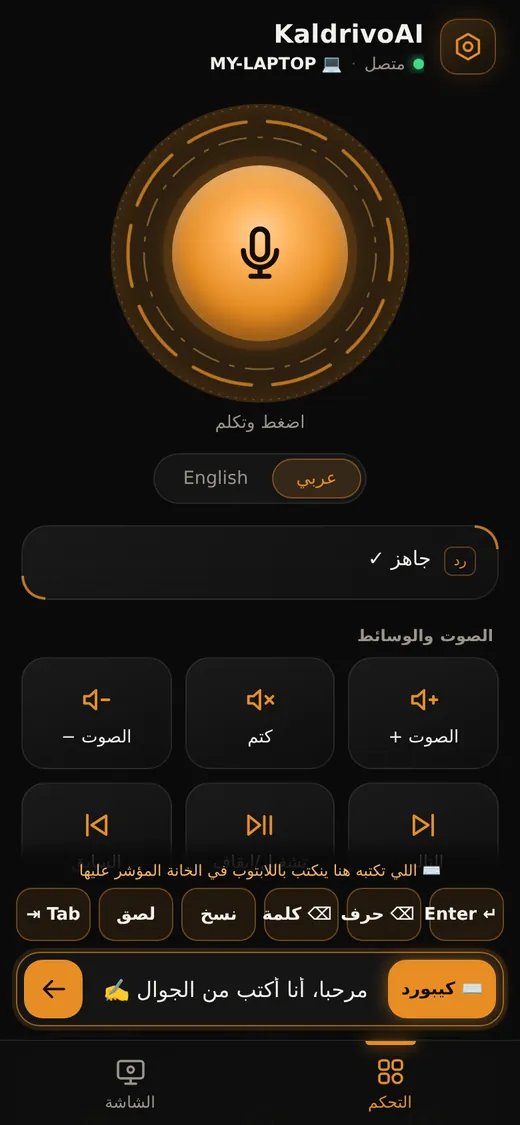
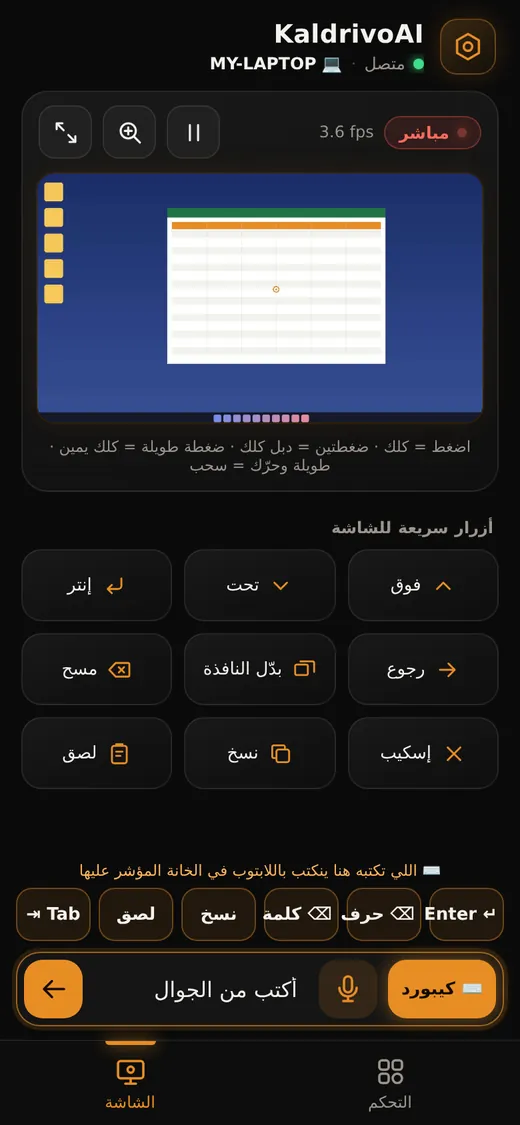
الدقيقة الأولى.The first minute.
لا شيء تتعلمه. هذا كل ما تحتاج إلى معرفته:Nothing to learn. This is all you need to know:
- التشغيلWake it
- صفّق مرتين، أو اضغط Clap twice, or press Ctrl+Alt+K، أو قل «استيقظ». يظهر الشريط أعلى الشاشة ويبدأ بالاستماع., or say “wake up”. The bar slides in and listens.
- التحدثTalk
- أمر واحد أو أكثر في جملة واحدة. يردّ عليك بصوت، ويبقى منتظراً أمرك التالي.One command or several in a sentence. It answers out loud and keeps listening for the next one.
- الإغلاقQuit
- Ctrl+Alt+Q، أو من أيقونته بجانب الساعة. ويمكنك سحب الشريط إلى أي مكان في الشاشة., or from its icon by the clock. You can drag the bar anywhere on screen.
- مفتاح GeminiGemini key اختياريoptional
- يضع كل مستخدم مفتاحه الخاص، وهو مجاني من Google AI Studio. يتيح المحادثة، والبحث إلى إكسل، والرد بلهجتك. والأوامر الأساسية تعمل من دونه.Each user adds their own key, free from Google AI Studio. It unlocks chat, research-to-Excel and dialect replies. The core commands work without it.
التوثيق.The docs.
التثبيت، والإعدادات، وتفعيل كل ميزة، وجميع الأوامر، وحل المشكلات، بالعربية والإنجليزية. ودليل PDF تحتفظ به.Install, settings, turning on each feature, every command, and troubleshooting, in English and Arabic. Plus a PDF guide to keep.
قريباً.Soon.
نعمل على ملف تثبيت واحد: تنقر عليه، فيُثبَّت البرنامج وتظهر أيقونته. سجّل وسنرسل لك رابط التحميل فور جاهزيته.We’re finishing a one-file installer: double-click, it installs, the icon appears. Sign up and we’ll email you the download link the moment it’s ready.
النسخة تجريبية ومجانية. ولأنها غير موقّعة رقمياً حتى الآن، قد تظهر رسالة «Windows protected your PC»: اضغط More info ثم Run anyway.It’s a free beta. It isn’t code-signed yet, so Windows may show “Windows protected your PC”: click More info, then Run anyway.
ويندوز ١٠ / ١١ ميكروفون إنترنتWindows 10 / 11 · mic · internet
ماذا يحدث
لكلامك؟What happens
to what you say.
بوضوح ودون تجميل.Plainly.
يعمل على جهازكIt runs on your PC
البرنامج يعمل على حاسوبك، وإعداداتك وذاكرته ومفتاحك محفوظة في ملفات لديك. ويُكتشف التصفيق على جهازك.The app runs on your computer; your settings, its memory and your key are files on your PC. Clap detection happens locally.
ما الذي يُرسل عبر الإنترنتWhat goes online
بعد تشغيله، يُرسل صوت أمرك إلى خدمة Google للتعرّف على الكلام، ويُحوَّل الرد إلى صوت عبر خدمة على الإنترنت. وإذا أضفت مفتاح Gemini، يُرسل نص أمرك (وصورة الشاشة حين تسأله عنها) إلى Gemini.Once you wake it, your spoken command goes to Google speech recognition, and replies are voiced by an online text-to-speech service. With a Gemini key, the text of your command (and a screenshot when you ask about your screen) goes to Gemini.
أفعال محددة فقطA fixed list of actions
يتحوّل كلامك إلى قائمة أفعال معروفة، ولا ينفّذ أوامر نظام عشوائية. ويسألك «هل أنت متأكد؟» قبل الإيقاف وإعادة التشغيل والسكون والقفل، ولا يُرسل أي بريد إلا بعد موافقتك.What you say maps to a known list of actions; it never runs arbitrary system commands. Shutdown, restart, sleep and lock ask “are you sure?” first, and an email only goes out after you say send.
هاتفكYour phone
تُقرأ جهات اتصالك من هاتفك وتُحفظ نسخة منها على حاسوبك فقط، ولا تُكتب في السجل. وتُسجَّل المكالمة بآخر ٤ أرقام فقط.Your contacts are read from your phone and cached on your PC only, never written to the log. Calls are logged with the last 4 digits only.